

ThaiFriendly Tips, Tricks, and Hacks for Dating in Pattaya
Last Updated on October 17, 2025 by admin
ThaiFriendly is the #1 dating app in Pattaya and Bangkok and has both free and paid options. Some stats report that ThaiFriendly has 10X the number of active users in Pattaya compared with Tinder. Here are some tips, tricks, and hacks for using both the free and paid versions of ThaiFriendly.
1. ThaiFriendly Free Messaging Hack

The free version of ThaiFriendly allows you to send one free message every 10 minutes; not enough for effective real-time communication. This means you either need to pay for ThaiFriendly Premium or find a way to communicate off the app. The two most popular messaging apps in Thailand are the Line App and WhatsApp. If you have a Thai SIM card in your phone, you can add or have people add you by your Line ID or with a photo of your Line QR code. Otherwise you may need to send a photo of your Line QR code to someone, then follow-up 10 minutes later with an explanation. Check out our tutorial on how to communicate with Thai people on LINE without a Thai SIM card. And learn even more Line app hacks for your trip to Pattaya.

For WhatsApp, all it takes is a phone number. However, WhatsApp requires a “real” phone number and can be used to breach your privacy if someone you connect with on WhatsApp uses it to discover you on Facebook. Be protective of your privacy on any dating app and don’t give out a phone number that could potentially ID you personally.
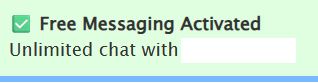
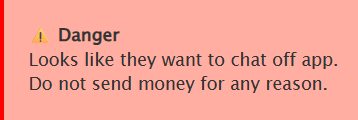
In some cases, merely mentioning an app like WhatsApp or Line in a message can trigger unlimited free messaging, even if it’s something like: “I don’t have WhatsApp, but I have the Line App.” Unlimited free messaging can also be triggered when a ThaiFriendly user sends you off-app contact methods. Sending a phone number, which would look like a WhatsApp ID, can trigger free messaging. In this case, it will also warn you not to send money. Good advice. Some are scammers. Especially those who start asking you about investments. Block them immediately.
2. Message Premium Members Using the Free Version
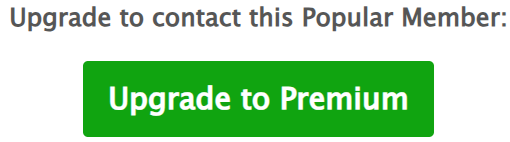
While using the Desktop version of ThaiFriendly, you may notice some profiles are marked Premium. You’ll be able to “Show Interest” and like them, but are urged to “Upgrade to contact this Popular Member.” Strangely, you can simply switch to the ThaiFriendly app on your phone, do a Username Search, then message away. “Premium Profile” restrictions seem to exist only when using the Desktop / web version. Please note, however, that profile names are case sensitive and name searches can be a bit quirky. Try entering a partial profile name if a full one isn’t returning the user you expect.
A much easier method: on the website, click on one of the photos in the profile, then click Add to Favorite Photos. Switch to the app, go to List > Saved Photos and voila, there’s your Premium profile. You may now send a message.
3. When and When Not to Message – Don’t Get Blocked
More attractive ThaiFriendly members can receive dozens or even hundreds of messages per day. Many are wary of people from abroad wasting their time. So it’s best to not message until you’re on the ground in Pattaya and ready to ask for a date. Otherwise you may be blocked. If you’re actually in Pattaya make that clear and lead with: “I’m in Pattaya now. What are you looking for?”
4. Purchasing Premium Hack
We recommend only purchasing ThaiFriendly Premium for the time you’ll be abroad. The minimum Premium subscription period is for a month, but billing is perpetual; and it’s easy to forget you’re paying for something you no longer need. So do this: go to your app store, purchase a ThaiFriendly subscription, then immediately cancel it. You’ll still be able to use it for 30 days.
Before you leave your home country, we strongly advise you to purchase or renew your ThaiFriendly subscription. Once you arrive in Thailand, regional restrictions and payment verification issues on the Apple App Store and Google Play Store frequently prevent Western travelers from completing purchases or renewing subscriptions using their foreign payment methods, which could leave you unable to access premium features while abroad.
5. Avoiding Scams – Video Call First
Both Thais and foreigners get scammed on ThaiFriendly. One common scam, or at least deceptive practice, is image filtering: the real person behind the profile may look almost nothing like the profile pictures. Pictures may be a decade old and/or filtered heavily with skin lightening, skin smoothing, and eye color filters . In some cases, the person who shows up to date you may be an entirely different person. The solution? Insist on a brief video call before you meet someone. While ThaiFriendly has no native video chat capability. Read our essential top tips for ThaiFriendly dating safety.
6. Can’t Find a Profile Using Search on the App?
The ThaiFriendly app is a bit quirky. Searching for a profile and can’t find it on the app? Open a web browser and put the profile name at the end of http://thaifriendly.com. For an example profile named Annie44591, you’d enter:
http://thaifriendly.com/Annie44591
Once you’ve found the profile, click on “Show Interest.” After that, return to the app and find the user in your List of liked profiles. Another quirk of searching for profiles on the app is that names are reportedly case sensitive, so be mindful of that. You can also try typing in a partial profile name on the app and see if your desired person appears that way.
7. Communicate in Thai without knowing Thai
You can either download Google Translate and copy/paste back and forth between it and ThaiFriendly or you can set-up a group chat in LINE to auto translate between Thai and English. Check out other useful Thai translation apps.
8. Use the Notes function to “Tag” Profiles and Search Them
The free version of ThaiFriendly allows you to add notes to profiles you like and search them later from List > Notes. You could include helpful tags like BKK for profiles located in Bangkok or PAT for ones in Pattaya. Since the free version of ThaiFriendly limits the number of profiles you can add as Favorites, you can use the Notes function to create a separate, unlimited Favorites list of sorts. When you click List > Notes, all profiles you’ve tagged appear.
The Notes section is also useful for storing LINE and WhatsApp IDs as a backup means of communication. Helpful because your notes persist even after a profile disappears from ThaiFriendly. Even if you can’t add a LINE user from outside of Thailand, you can save LINE IDs to add once you arrive and purchase a Thai SIM card.
9. Learn To Distinguish Normal Profiles from Transactional Ones
If you’re looking for a real relationship rather than a transactional one, learn how to spot ThaiFriendly profile Red Flags.
10. What Happened to My Interests and My Favorites lists?
If you’re using the web version of ThaiFriendly, you may notice that your “My Interests” and “My Favorites” lists get limited to a single page. If you look closely you’ll see ThaiFriendly trying to get you to purchase ThaiFriendly Premium on the screen: “Get full access to all your lists – upgrade your account to Premium.” No, just go to the app and you’ll have full access. This is yet another of the weird discrepancies I’ve noticed between the web browser-based version of ThaiFriendly and the app. The web version still seems to allow full access to your Saved Photos, but that almost seems like something they forgot to throttle.

Conclusion
ThaiFriendly can be a great way to meet people in Pattaya, Bangkok, Phuket, Chiang Mai, and other parts of Thailand and the free version may be all you need. Should you upgrade? Read our article ThaiFriendly Premium: Worth the Money for Dating in Pattaya? Want to know even more about ThaiFriendly? Then read our comprehensive article ThaiFriendly Guide: 30 Dating Tips and Tricks for Pattaya.
Learn about more dating apps for Pattaya. For other apps to make your experience in Pattaya easier and richer, be sure to read our article: “10 Essential Travel Apps for Pattaya.”


Pingback: Use the LINE App Outside of Thailand to Connect with ThaiFriendly Users - Pattaya Guidebook
Pingback: How to Meet People in Pattaya - Pattaya Guidebook
Pingback: 10 Essential Travel Apps for Pattaya - Pattaya Guidebook
Pingback: The 5 Best Dating Apps for Pattaya - Pattaya Guidebook
Pingback: ThaiFriendly Premium: Worth the Money for Dating in Pattaya? - Pattaya Guidebook
Pingback: ThaiFriendly in Pattaya: Spot the Dating Red Flags - Pattaya Guidebook
Pingback: ThaiFriendly Dating Safety Tips for Pattaya - Pattaya Guidebook
Pingback: ThaiFriendly Guide: 30 Dating Tips and Tricks for Pattaya (2025) - Pattaya Guidebook