

Auto Translate Thai to English in LINE App chats
Last Updated on September 28, 2025 by admin
The LINE app has become a must-have tool for many, especially in Pattaya. LINE also provides an easy way to bridge the language gap between Thai and English speakers. Users can communicate seamlessly with friends or colleagues regardless of their language proficiency. If you haven’t already, read about the 10 Essential Travel Apps for Pattaya you should install before you go.
1. Add “TH-EN translator” as a Friend
Open LINE, search for “TH-EN Translator” and add as a Friend. Given the semi-recent changes LINE has made with adding users, you may not be able to add the translator without having a Thai SIM card.
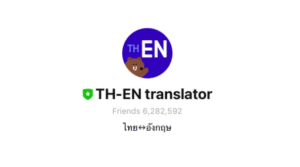
2. Set Up Your Group Chat
To begin translating Thai to English and vice versa, create a group chat on the LINE app that includes the TH-EN translator user alongside the person you wish to communicate with. Simply open your LINE app, click on the + symbol icon that looks like the outline of a person, and select the ‘Create Group’ option. Invite the translator and your contact. Give the group an intuitive name like: “Translator with <Friend Name>.”
3. Select Your Group Chat and Begin
It’s as simple as that. Translation may not be perfect. If you’re not understood, try phrasing something a different way. For in-person communication, some feel the ChatGPT app does a better job translating Thai than either LINE or even Google Translate.
Conclusion
Using the LINE app for translation offers several advantages. First and foremost, it eliminates misunderstandings that can arise from language barriers. The immediate translation feature means that both parties can respond promptly, keeping the dialogue engaging.
The LINE app serves as a practical tool for anyone looking to translate conversations from Thai to English effortlessly. By setting up a group chat with the TH-EN translator, users can enhance their communication experience, making it easier to build connections across languages. Learn even more LINE App hacks for Pattaya.



Pingback: Use the LINE App Outside of Thailand to Connect with ThaiFriendly Users - Pattaya Guidebook
Pingback: Unlocking Thaifriendly: Tips, Tricks, and Hacks for Dating in Thailand
Pingback: Top Apps to Translate Thai: Your Essential Digital Language Toolkit - Pattaya Guidebook
Pingback: LINE App Hacks for Your Pattaya Trip - Pattaya Guidebook
Pingback: ThaiFriendly Guide: 30 Dating Tips and Tricks for Pattaya (2025) - Pattaya Guidebook